A secrets app that keeps one file where you already keep things
Kind: research, a storage design and a build plan. From: the owner's voice note of 14 November 2026, after trying the Secrets part of SGit Vaults: "even just that is a crazy feature; we should just ship it". Written up by the secrets-app research session the same day. Nothing on this page is built unless it says so. The only record of what exists is what is built (and, for SGit Vaults, its own reality file).
The idea in one line: a cheap password and secrets manager that just works, where the vault is one small encrypted file in your own iCloud Drive, rewritten on every change, opened by a key that never reaches us, with our server only ever an extra copy.
1. What the owner asked for
His words where they matter:
- Ship the Secrets screens as their own product: "an easy, cheap password and secrets manager" that "just works", on what exists: an encrypted, version-controlled vault, all cryptography on the device, a server that sees only ciphertext.
- Do not depend on our server by default. "Our services are not ready to provide that level of resilience; this becomes mission critical", and a server connection "breaks the whole model". Keep the vault as one small encrypted file (a zip of the vault) in storage the person already has, above all iCloud Drive, rewritten on every change, with a few past versions kept, and refreshed when the app opens.
- Several stores at once: iCloud Drive, a local file, a downloaded copy that the
sgitcommand can open, and optionally SG/Send for online access. Never the server as the default. - Options for the key: today it is in iCloud Keychain; also a passkey wrapping the file, or something else.
- Sharing later: swap public keys by QR code or copy and paste, seal a vault key to the other person, share with a browser session.
- Pricing per use, like VoiceDebrief's credit, in 1p steps.
2. What exists in this repository today
Read on 14 November 2026. Labels as in the reality files: built is tested in CI, unverified is written and compiled but not yet proven on a device, proposed does not exist.
| Part | Where | Status |
|---|---|---|
Secrets screens: kinds login, device passcode, Wi-Fi, card, note, token, vault key, read key, access key, recovery codes; each secret one encrypted JSON file (sgit.ai/secret/v1) in a vault's secrets/ folder, each change one signed commit; values behind Face ID, copied for two minutes; a strong-password maker; "My secrets" made on first use | Apps/SGit/Sources/Secrets/ (SecretEntry.swift, SecretsView.swift, VaultShelf+Secrets.swift) | Unverified |
Vaults on the device with no server: the server's own layout (bare/data, refs, indexes, keys) in a folder under Application Support | VaultBook, VaultShelf, Packages/SGitVault | Unverified (CI tests with folders) |
| Vault keys and access keys in iCloud Keychain, one synchronisable item each, a switch to keep them on one device | Engine/SecretStore.swift in both apps | Unverified; iCloud Keychain itself cannot be tested in CI |
| Push and pull to a server: creation and fast-forward only. When both sides have changed it says so and writes nothing: merge is not built in Swift | Packages/SGitVault/Sources/SGitVault/VaultSync.swift | Unverified against the live server |
| The passkey door: a vault key derived from a passkey's PRF output, or from a 26-character recovery code in its place | VaultDoor.swift | The derivation is built and matches the website's vectors; the passkey ceremony in a native app is not built (issue 003) |
| Cards, sealed messages, first contact (an access key sealed to a newcomer's card), a secrets store that remembers who gave what | Packages/SGitPeople | Unverified, on no screen |
| Paying for anything | Model/Prices.swift, the credit ledger in VoiceDebrief | Ledger and price list built; the App Store purchase is written and switched off, so no money moves |
| A vault as one file in iCloud Drive, several stores, a merge after offline edits, a third app | Proposed: this page |
Two things were checked for this article with the real sgit command (sgit-ai 0.27.0, from PyPI, in this session):
- A vault zipped as one file opens with the command line. A vault was made in sgit's in-memory server, its store written out as a folder (
bare/data,bare/refs,bare/indexes,bare/keys) and zipped: 31 objects after five commits, 17,125 bytes. Unzipped elsewhere,sgit clone --transport local --base-url <folder> <vault key> outcloned it, the files were there andsgit history logshowed every commit, including the merge. - sgit merges two copies that changed apart. Two clones of one vault each committed while "offline" (different secrets). The second push pulled, merged into a merge commit, and pushed: all three secrets present. When both changed the same secret,
pullreportedconflicts: ['secrets/wifi.json']and asked for a resolution.
So the format and the merge exist in sgit's Python. What does not exist is the same merge in Swift, and the file store.
3. The field: how other managers store, sync, recover and share
Prices move often and many come from aggregators; treat them as approximate. The fuller field study, with sharing and team features, is the opportunity brief written for SGit Vaults.
| Product | Where the vault lives | Sync | If every device is lost | Sharing | Price (approx.) |
|---|---|---|---|---|---|
| Apple Passwords | iCloud Keychain, end-to-end encrypted | Apple, invisible | Apple Account recovery: trusted number plus a recovery contact or recovery key; without them the data can be gone | Shared groups; owner and members, no roles | Free, built in |
| 1Password | Vendor cloud | Vendor | Secret Key plus account password (an Emergency Kit to print) | Shared vaults | About $48 a year individual, $72 family, from March 2026; no free plan |
| Bitwarden | Vendor cloud, or self-hosted | Vendor or your server | Master password; emergency access on paid plans | Organisations; a free one holds two people | Free; Premium $19.80 a year, Families $47.88 (raised in 2026) |
| Proton Pass | Vendor cloud | Vendor | Proton account recovery | Shared vaults on paid plans | Free; Plus about $2 to $3 a month |
| Dashlane | Vendor cloud | Vendor | Account recovery options | Sharing, groups | Free plan reported withdrawn in 2025; paid plans only |
| Keeper | Vendor cloud | Vendor | Account recovery | Shared folders with permissions | Limited free; Family about $46 a year |
| Enpass | A file in your own cloud (iCloud, Dropbox, Google Drive, OneDrive, WebDAV) or Wi-Fi sync; no Enpass servers | The cloud you chose | Master password; nothing at Enpass to recover | Share an item; a shared vault through a shared cloud folder | Subscription or a one-off licence; figures vary widely |
| KeePass, KeePassXC | One .kdbx file wherever you put it | Whatever syncs the file | Master password and optional key file; nothing to recover | Share the file and its password | Free, open source |
| Strongbox (KeePass on Apple) | A .kdbx file, by default in its own iCloud Drive folder; or Strongbox Sync on CloudKit | iCloud Drive or CloudKit | As KeePass | As KeePass | Free with a Pro tier or lifetime |
What the file-based ones teach, because they are closest to the owner's idea:
- A file in iCloud Drive works, and it has a known failure. Strongbox recommends keeping the database in its own iCloud folder, which the app watches; it blames numbered duplicate copies on slow iCloud sync; and it now recommends its own CloudKit sync instead. Guides on KeePass sync warn that iCloud and Google Drive behave as last-writer-wins: the losing device's change leaves the active file unless the app merges.
- KeePass merges at the entry level. KeePassXC and Strongbox can merge two databases using each entry's modification time and its own history. That is good, but it is a merge by timestamp of a whole entry; there is no common ancestor, so an entry changed on both sides keeps the later one and puts the other in its history.
- Enpass proves people will choose their own cloud to avoid trusting a vendor's servers.
4. Positioning: where others already use keys, and where this is different
The owner, 14 November 2026: competition is fine ("there could be multiple competing password managers"); what he wants, every person and device with a key pair, sharing by key exchange, sealed messages, is "not really embraced" by the existing ones. So this section is positioning, not a case against building. It has to be accurate, because several of them do use public keys underneath.
4.1 Key-based sharing in the others
| Product | Keys per person? | How sharing works | Who vouches for the other person's key | Can the person see or use their keys? |
|---|---|---|---|---|
| 1Password | Yes: each user has a key pair (RSA-OAEP) made on their device | A vault key is encrypted to each member's public key | 1Password's server hands out members' public keys | No: hidden inside the account |
| Bitwarden | Yes: an RSA key pair per user | An organisation's key is encrypted to each member's public key; an admin confirms new members, optionally by fingerprint phrase | Bitwarden's server, with the optional fingerprint check | Only as a fingerprint phrase |
| Proton Pass | Yes: Proton's PGP keys | A vault key is encrypted to the invitee's key; the invitation is signed with the sender's key | Proton's Key Transparency log makes swapped keys detectable | No, though the keys are standard PGP underneath |
| Apple Passwords (shared groups) | Apple handles keys for each Apple Account | Members added by the group owner through iCloud Keychain | Apple | No |
| KeePass, Strongbox, Enpass | None | Share the file and its password | Nobody | n/a |
So "end-to-end encrypted sharing with public keys" is not new: 1Password, Bitwarden and Proton do it. What they share is that the key is theirs to manage and their server introduces you to the other person. Proton's Key Transparency is the strongest answer among them to a server that lies; the 2026 ETH Zurich study showed what happens without one (see the opportunity brief).
4.2 Where this one is different
- Keys the person sees and owns. Your key pair is yours: shown as a card, exportable to
sgit's own key store, the same pki.sgit.ai format, usable without our app. - Met in person, or by any message. Cards are swapped by QR code face to face, or pasted from WhatsApp or mail, and the contact remembers which. No directory introduces anyone; nothing depends on our server being honest.
- One key for everything. The same key receives sealed messages, opens shared vaults, receives a single secret, and signs (through the device keys it vouches for) every commit. A secret, a message and a vault invitation are the same act: seal to a card.
- Agents are people too. An AI session has a card and an inbox, and can be given exactly one secret, with a record.
- A merge with a common ancestor, not a timestamp. Each copy of the vault is a commit graph; two devices that changed different secrets merge with no question, and one secret changed on both is shown with the version both started from. KeePass merges by time; iCloud alone drops one side.
- The file cannot be half-merged into nonsense. Objects are named by the hash of their ciphertext, so two copies join by plain union; only the two heads need merging.
- Signed history of every change, kept in the format rather than per entry.
- Secrets and files together, in one vault: a passport scan, an SSH key file, a recovery sheet.
- One format, several stores, no lock-in. iCloud Drive, a Mac folder, a USB stick and SG/Send at once; the open
sgitcommand reads any of them.
4.3 Where it is not different, said plainly
- Apple Passwords is free, built in, fills passwords and passkeys everywhere, and syncs with no thought. We do not beat it on convenience until AutoFill is switched on.
- Strongbox already keeps an encrypted file in iCloud Drive, with Face ID, AutoFill, history per entry and a merge.
- Enpass already lets you choose your own cloud.
- Encryption on the device and a server that sees only ciphertext is what every serious manager claims.
The positioning in one line: the first secrets manager where your keys are yours, the people you share with are people you met, and the same keys carry your messages, vaults and agents, with a vault that lives in your own iCloud as one file. The first version competes with Strongbox and Enpass on "your file, your cloud"; the keys and sharing are what nobody else offers in this form.
5. The storage design
5.1 The vault on the device is the truth
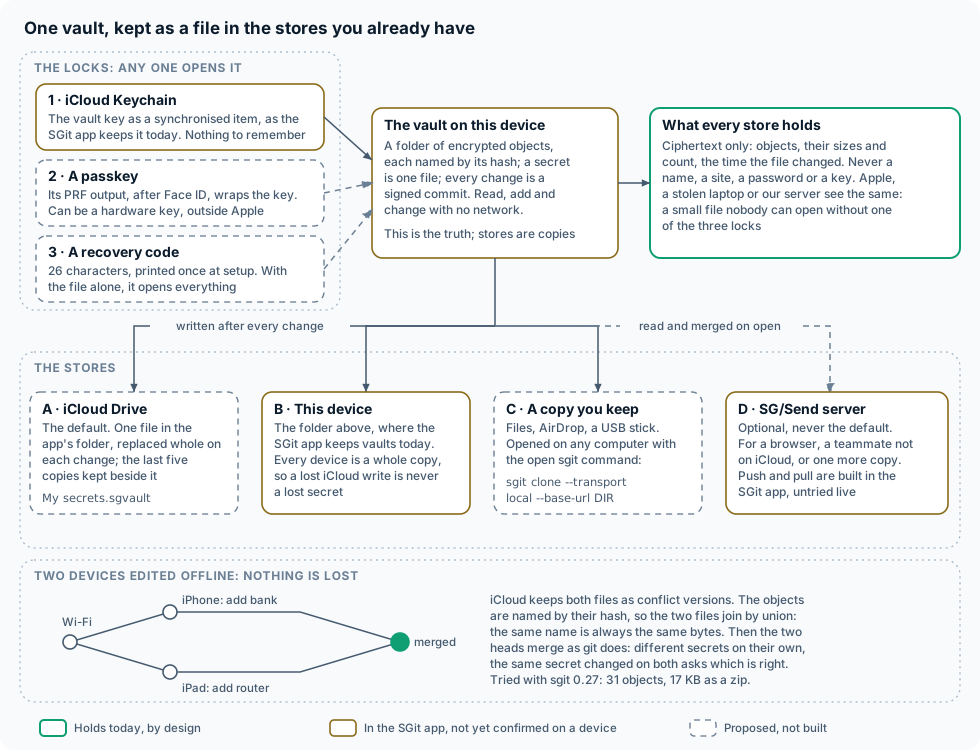
Every device keeps the whole vault in the layout the SGit app already uses (Application Support/vaults/<vault id>/bare/…). Reading, adding and changing need no network and no store. Each store is a copy that is written after every change and read and merged when the app opens or comes to the front. This is the "a vault is local first and a server is a remote" position, with iCloud Drive as the first remote.
A consequence that matters for "mission critical": a write that iCloud loses is not a lost secret. The device still holds its commits, and its next write carries them, merged.
5.2 Store A: one file in iCloud Drive (proposed)
  iCloud Drive / Secrets (the app's own folder, visible in Files)
  ├── My secrets.sgvault             the vault: a zip of bare/, about 20 KB to a few MB
  └── .versions/
      ├── My secrets 2026-11-14T09-12-03Z iPhone.sgvault
      ├── My secrets 2026-11-14T08-40-51Z iPad.sgvault
└── ... the last five, oldest removed- The container. The app's own ubiquity container, with
NSUbiquitousContainerIsDocumentScopePublicso the folder shows in Files and on a Mac's iCloud Drive. It needs the iCloud capability with iCloud Documents and a container identifier registered in the developer portal: an owner step. - What the file is. A zip of the vault's
bare/folder (compression helps little: the objects are already encrypted), plus a small cleartext header file naming the format and holding the wrapped copies of the vault key (5.7) and the head it holds (5.4). It is already encrypted object by object; zipping it adds no secrecy and needs none. - Writing. After each commit: build the new zip in a temporary file, then
NSFileCoordinator.coordinate(writingItemAt:options: .forReplacing)andFileManager.replaceItemAtso that iCloud sees one atomic replacement, never a half-written file. Before replacing, move the previous file into.versions/and remove the oldest beyond five. - Reading. On launch and on coming to the front: an
NSMetadataQueryon the container finds the file; if it is not downloaded,startDownloadingUbiquitousItem(at:); read it with a coordinated read; unpack into a temporary folder; treat it as a remote and merge (5.3). While the app is open, anNSFilePresenterhears of changes from other devices. - Conflicts. When two devices replaced the file while apart, iCloud keeps one as current and the others as
NSFileVersion.unresolvedConflictVersionsOfItem(at:). The app merges each into the current one, writes the result, marks each conflict version resolved and callsremoveOtherVersionsOfItem. Nothing is chosen by time. - Size. Measured: 31 objects, 17 KB. Estimated, not measured: a change to one secret adds about three small objects (blob, tree, commit), so a few hundred secrets with a few thousand changes is a few megabytes. When it grows,
sgit pack compact(which exists in the command line) or a Swift equivalent can fold history into fewer objects. A whole-file rewrite of a few megabytes is nothing for iCloud; many small files were the problem the owner remembers, and this avoids it.
5.3 Two devices that edited offline (proposed in Swift; works in sgit today)
   before          iPhone, on a plane           iPad, at home
   ──────          ─────────────────            ─────────────
     O ──────────── A  "Add bank"
      \
       └─────────── B  "Add router"

   back online: iCloud holds two versions of My secrets.sgvault

   1. union the objects:  objects(A-file) ∪ objects(B-file)
                          (a name is a hash, so equal names are equal bytes)
   2. two heads, A and B; their common ancestor O is in both
   3. three-way merge of the trees, path by path:
        only A changed secrets/bank.json     → take A
        only B changed secrets/router.json   → take B
        both changed secrets/wifi.json       → a conflict: keep both, ask
   4. a merge commit M with parents A and B, signed by this device
   5. write M as the new file; resolve the iCloud conflict versions

     O ── A ──┐
      \       M   one file again, nothing lost
       └─ B ──┘
Because each secret is its own file, step 3 almost never finds a conflict. When it does, the app keeps both values (one under a conflict name) and shows them side by side with the value both started from, and the person picks. Exactly this ran in sgit 0.27 in this session; in Swift, the merge is the main piece of new engine work (issue 006 lists it among the vault engine's gaps).
5.4 Two writers at the same moment (proposed)
The owner's requirement: two people or two devices writing the same vault file at once must never corrupt it. The server already has this property: a push moves the branch with compare-and-swap, so a write based on a stale head is refused and the writer pulls, merges and tries again; nothing is ever overwritten. iCloud Drive has no compare-and-swap across devices, so the file store has to get the same guarantee another way.
The rules:
- Every file written contains everything in the file it replaces. Inside one coordinated block (
NSFileCoordinator.coordinate(readingItemAt:options:writingItemAt:options:), which is exclusive between processes on this device, the app and any extension), the app reads the current file, unions its objects with the device's vault and merges its head, and only then writes. A write can add history; it can never remove it. That is the file-store form of compare-and-swap: never replace a copy you have not merged. - The header names the heads. The file's small header lists the head commit it holds. Before replacing, the app checks that head is in its own history; if not, it merges first (rule 1). If the file changed while the app was merging, it reads and merges again before writing.
- Across devices, a collision becomes two versions, never a torn file. The replacement is atomic, so another device sees the old file or the new one. When two devices replace it while apart, iCloud keeps one and offers the other as an
NSFileVersionconflict version. The app merges each conflict version and removes a version only once its head is reachable from what it has just written, so a late conflict version is never thrown away unread. - Every device is a whole copy. Even if iCloud lost a version, the device that wrote it still holds its commits and its next write carries them.
- Past copies. Five earlier files in
.versions/, each named by time and device, as a last resort against a bug in the app itself. - The person sees it. A merge is a commit like any other, signed by the device that made it, and the app says so: "Merged changes from the iPad (2 secrets), 09:14" on the store's line and in the history. A conflict on one secret is a question, not a silent choice.
Where the file store is weaker than the server, and when the server is worth paying for:
| iCloud file | SG/Send server | |
|---|---|---|
| A stale write | Becomes a conflict version, merged later | Refused at once; the writer merges first |
| How fast the other device sees a change | Seconds to minutes, sometimes hours; order not guaranteed | As soon as it pulls |
| Two people | Only through a shared iCloud folder between two Apple Accounts, slower and more prone to conflicts | Designed for it |
| Someone without an Apple device, or a browser | No | Yes |
| A write-only inbox (a contractor drops a secret in) | No | Yes: append lanes |
| A copy outside Apple | No | Yes |
| Cost to us | Nothing: the person's own iCloud | Small, per push (section 9) |
So the file store is right for one person on their own Apple devices, which is the first version. The server is worth paying for once a vault is shared between people, needs to be seen in a browser, must take secrets from outside, or the person wants a copy that does not depend on Apple.
5.5 Stores B, C and D
| Store | What it is | Written | Read | Status |
|---|---|---|---|---|
| A · iCloud Drive | One file and five past copies in the app's folder | After every change | On open, on coming to the front, on a change notice | Proposed |
| B · This device | The vault folder in Application Support | Always: it is the vault | Always | Unverified (the SGit app keeps vaults this way) |
| C · A copy you keep | The same .sgvault file, saved with the share sheet to Files, AirDrop, a USB stick; also a scheduled copy to another folder of the person's choice through a security-scoped bookmark | On request, or after each change if a folder was chosen | Imported and merged like any store | Proposed (the command line reading it is checked) |
| D · SG/Send server | The vault pushed to dev.send.sgraph.ai (later production) | After every change, when switched on | On open | Unverified (push and pull built, fast-forward only) |
Opening a copy on a computer (checked with sgit-ai 0.27.0):
pip install sgit-ai
mkdir vault && cd vault && unzip "../My secrets.sgvault"
sgit clone --transport local --base-url "$PWD" "<vault key>" ../my-secrets
cd ../my-secrets && ls secrets && sgit history log
The vault key is shown in the app behind Face ID, or derived from the recovery code (a small sgit addition would accept the code directly: proposed). The local transport is read-only: the computer can read and check every signature, and writing back goes through the app or a server.
The server, if switched on, adds a browser view and a copy that is not Apple's, and it is the only store that can reach someone outside the person's own Apple account. It is never needed to open, read or change a secret.
5.6 Multiple stores, one rule
Every store is a remote; the device's vault is the only working copy. On open the app reads every store it can reach, unions objects, and merges heads, in a fixed order (this device, iCloud, the server, any copy folder). After a change it writes to every store that is switched on, and shows one line per store: "iCloud: saved 09:12", "Server: not switched on", "Copy on USB: last saved 3 days ago". A store that fails is retried and said, never silent; a store that is behind is simply written again.
5.7 Who holds the key: custody options
The vault key opens everything, so the design separates the file from the locks that open it, the way disk encryption keeps several key slots. The file's header holds the vault key wrapped once for each lock the person has set up; any one lock opens it.
| Lock | How it works | What it protects against | What it does not | Status |
|---|---|---|---|---|
| 1. iCloud Keychain | The vault key as a synchronisable Keychain item, as the SGit app keeps it today | Losing one device; nothing to remember; Apple cannot read Keychain items | Someone who takes over the Apple Account and knows a device passcode gets both the key and the file: one account is a single point. A synchronised item cannot also demand Face ID | Unverified (SGit app) |
| 2. A passkey | A passkey made for the app; the WebAuthn PRF extension (ASAuthorizationPublicKeyCredentialPRFAssertionInput, iOS 18 and later) returns the same 32 bytes for the same passkey and input, after Face ID; HKDF of those bytes wraps the vault key in the header. The same derivation as the passkey door already built | Face ID every time; the passkey can live on a hardware security key or in another passkey manager, outside the Apple Account, which breaks the single point above | A passkey in iCloud Keychain is in the same account as lock 1. Needs a relying party domain and associated domains (issue 003). Apple fixed a bug where PRF output differed between local and cross-device use in iOS 18.4 | Derivation built; ceremony proposed |
| 3. A recovery code | 26 base32 characters (128 bits), shown once at setup with a page to print; it wraps the vault key in the header (the door's recovery code path) | Losing every device and the Apple Account: the file in any store plus the paper opens it | Whoever finds the paper and a copy of the file has everything. Lost paper is no harm while another lock remains | Derivation built; screens proposed |
| 4. People you trust (later) | Parts of the vault key sealed to three of five confirmed contacts (SGitPeople) | Losing everything, with no paper | Hard to get right; later | Proposed |
Recommended default: lock 1 on, so that it "just works" on every Apple device; lock 3 offered at setup and again after the tenth secret, until it is done; lock 2 as the choice for people who want the key away from Apple, ideally on a hardware key. The app always shows which locks exist ("This vault opens with: iCloud Keychain, recovery code").
5.8 Threat model, store by store
| Who | Gets | Can read secrets? | Notes |
|---|---|---|---|
| Apple, or a breach of iCloud Drive | The .sgvault file and its past copies | No: objects are encrypted with keys from the vault key | Sees size, change times, and that the person uses this app. iCloud Drive is not end-to-end encrypted without Advanced Data Protection; it does not need to be |
| Apple, iCloud Keychain | The vault key, if lock 1 is on | Keychain is end-to-end encrypted; Apple states it cannot read it | The real risk is account takeover plus a device passcode: then file and key together. Lock 2 on a hardware key, with lock 1 off, closes it |
| A thief with an unlocked phone | The app | Only after Face ID or the passcode for each hidden value | The app covers itself in the app switcher (already built) |
| A thief with a locked phone | Nothing usable | No | Data protection classes; the vault folder is encrypted at rest by iOS as well |
| Someone who finds the USB copy | The file | Not without a lock | The same as Apple's position |
| Someone who finds the printed code | A lock | Only with a copy of the file too | Keep the paper away from the computer |
| The SG/Send server, if switched on | The objects and the hash of the write key | No | It can refuse or delete, so it is never the only store. It cannot substitute keys for sharing, because keys come from cards |
| Two devices writing at once | Two versions | n/a | Merged; nothing chosen by time; past copies kept (5.4) |
| A corrupt or truncated file | One bad version | n/a | Each object checked against its hash before use; the five past copies and every device's own copy remain |
6. Sharing and collaboration, later
The pieces are in SGitPeople (unverified, on no screen): signed cards as text, a link or a QR code; sealed messages; first contact. Sharing a vault is then: scan or paste the other person's card, seal the vault key (or a read key, for read-only) to their key, drop it in their inbox or hand it over as an m1. code. Their copy of the vault needs a store both can reach, and two Apple Accounts do not share an iCloud folder, so a shared vault is where the server (store D), or a shared iCloud folder, becomes useful. A browser session is the same: it gets a card of its own and a sealed read key for a while. None of this is in the first version.
7. Names
Checked roughly on 14 November 2026: an App Store search for an app of that name, an obvious trademark, and whether the .app, .ai or .com domain is registered (RDAP lookups; registered means someone holds it, not that it is in use). None of this is a trademark search.
| Name | The case for it | Rough check |
|---|---|---|
| SGit Secrets | Says the family and the thing; one product line with SGit Vaults; secrets.sgit.ai is already ours as a design page | "Secrets" alone is taken (Outer Corner's Secrets 4, a long-standing Apple password manager), so always with the prefix. Clear |
| Tinvault | A tin: small, cheap, yours, kept on a shelf you own. Short, friendly | tinvault.app and tinvault.ai unregistered; tinvault.com registered. No app found |
| Keyfold | Every key folded into one small file | keyfold.ai unregistered; .app and .com registered. No app found |
| Postern | A small back gate in a castle wall: the door design, and a way out that does not depend on the main gate (our server) | postern.app and .ai registered; no app found. Obscure word, needs explaining |
| Pennysafe | Says the pricing: a safe that costs pennies | pennysafe.app unregistered, .com registered. "Safe" is a crowded word |
| Vaultfile | Says exactly what it is: your vault, as a file | vaultfile.app unregistered. Generic, hard to protect |
| Strongroom | Solid and British | An App Store app "strong room" (a password manager) exists; .app and .ai registered. Clash |
| Coffer | A box for valuables | "Coffre Noir" is a password manager; coffer.app and .ai registered. Weak |
| Sealbox | Sealed, a box | sealbox.app registered; "SealPass" is a password manager. Weak |
| Wicket | A small door in a larger gate | Apache Wicket is a well-known web framework; wicket.app registered. Clash |
Recommended, in order: SGit Secrets (no clash, uses the brand we are building, and says what it is), Tinvault (a name of its own if the product should stand apart from sgit; the .app and .ai are free), Keyfold (the file idea in one word). The owner decides; a proper trademark search comes before any public listing.
8. A build plan
8.1 Shape
A third app target in this repository, Apps/Secrets/ (bundle identifier to be chosen with the name, for example ai.sgit.secrets.app), reusing:
Packages/SGitVault: the engine, plus two additions recorded in itsSOURCE.md: a file store (zip a vault folder, unzip into a temporary folder, union two object sets) and a three-way merge of two heads with per-path conflicts.- The SGit Secrets code:
SecretEntry,SecretKindOfEntryandPasswordMakermove into a small new local package (Packages/SGitSecrets) that both apps use; the screens are adapted to it rather than toVaultShelf, which belongs to SGit Vaults. Packages/SGitPeoplelater, for sharing.
Adding a target and a package means editing the hand-written Xcode project, which one session at a time may do (CLAUDE.md); a new CI workflow on the pattern of sgit-app.yml; a TestFlight group of its own.
8.2 Steps, each green in CI before the next
| Step | What | Tested by |
|---|---|---|
| 1 | SGitSecrets package: the entry format and password maker moved out of the SGit app, SGit Vaults switched to it, nothing else changed | Its unit tests and the SGit app's, green |
| 2 | The file store in SGitVault: zip, unzip, union, atomic replace into a folder, five past copies | Unit tests with temporary folders; the zip written by Swift read by sgit clone --transport local in CI (as sgit_reads_swift.py does today) |
| 3 | Merge in Swift: common ancestor, three-way tree merge, conflict files, a signed merge commit with two parents | Unit tests; a merge made by Swift checked by sgit and a merge made by sgit read by Swift, in CI |
| 4 | The app target: one vault, "My secrets", the Secrets screens, Face ID, history of a secret | Unit tests on the CI simulators |
| 5 | Store A: iCloud Drive with NSFileCoordinator, NSMetadataQuery, NSFileVersion conflicts | Unit tests with a folder in iCloud's place; iCloud itself only on the owner's devices |
| 6 | Locks: iCloud Keychain (from SGit), the recovery code and its printable page; the key header in the file | Unit tests, the door vectors |
| 7 | Store C: export, a chosen copy folder, import and merge; the command-line instructions in the app | Unit tests; the CI check of step 2 |
| 8 | Credit: the VoiceDebrief ledger and price list, the purchase still switched off until the owner says | Unit tests |
| Later | Lock 2 (passkey PRF, after issue 003), store D (server), AutoFill (an owner step in the portal), import from Apple Passwords, Bitwarden and 1Password CSV or Credential Exchange, sharing through SGitPeople |
8.3 The first version does
One person, on iPhone, iPad and Mac (the Mac as a "designed for iPad" or Catalyst build, as SGit Vaults is). One vault. The ten kinds of secret from SGit, the password maker, Face ID, copy with expiry, the history of each secret. iCloud Drive and the device as stores, with a merge after offline edits and five past copies. Export a copy, and instructions to open it with sgit. iCloud Keychain and a printed recovery code as locks. Credit, counted, with no money taken until the purchase is switched on.
8.4 The first version does not do
AutoFill in Safari and other apps (until the capability is switched on, the app copies). Storing passkeys. Sharing with another person or a browser. The server. Passkey as a lock. Import from other managers. Android, Windows or a web app. Any model, on the device or elsewhere. Each of these is said in the app where a person would look for it, not hidden.
8.5 Owner steps
- Choose the name and the bundle identifier.
- In the developer portal: the App ID with iCloud (iCloud Documents, a container), and later AutoFill Credential Provider and an App Group.
- A TestFlight group.
- Decide the default locks (recommended above) and the prices (below).
9. Pricing
The owner, 14 November 2026: the usage model, "I don't like that rent model", with credit bought in advance as in VoiceDebrief. The ledger is VoiceDebrief's credit: a balance in micro-credits (a penny is 10,000), prices in whole pence, charged after something is done, never blocking. One rule above all for a secrets manager: reading, searching, copying, opening and exporting are never charged and never blocked, even below zero, in the way VoiceDebrief never charges or stops a recording. A person must always be able to reach their own passwords.
9.1 What the operations cost us
Estimates, not measurements: our server's real costs are not known to this session. Public object-storage list prices are used as a stand-in (about $0.023 a GB a month to store, $0.005 per thousand writes, $0.0004 per thousand reads), with a margin for the API in front.
| Operation | What happens | Cost to us, roughly |
|---|---|---|
| Add or change a secret, iCloud and device only | A commit on the device; one file rewritten in the person's own iCloud | Nothing |
| Read, search, copy, open | On the device | Nothing |
| Merge two devices | On the device | Nothing |
| Push one change to the server | Three or four small objects in one batch, and a compare-and-swap on the ref: two or three requests, a few KB | About a thousandth of a penny |
| Keep a vault on the server | A few MB for a vault of secrets | About a hundredth of a penny a month |
| Read from the server on open | A handful of requests | Well under a tenth of a penny a month for daily use |
| Share a vault with a person | A sealed message to their inbox: one append | About a thousandth of a penny |
| A large file on the server | Its size | About 0.002p per MB a month; the one thing that could cost something |
| Apple's share of a top-up | 15% under the App Store Small Business Program, else 30% | 75p of a £5 pack |
The honest conclusion: apart from Apple's share and large files, nothing a person does costs us a measurable amount. Prices are what the product is worth and what feels fair, not a pass-through of costs.
9.2 Three options, costed for three people
Prices for options A and B: a change 1p; a push to the server 1p (only when the server copy is on); a further vault 10p; sharing a vault with a person 10p; a large file 1p per 10 MB uploaded; changes and pushes capped at £1 a month, so a heavy user never pays more than a rival's subscription.
| A year of | Light: 5 changes a month, no server | Typical: 20 changes a month, server on | Heavy (a family): 150 changes a month, server on, 4 people shared |
|---|---|---|---|
| A. Credit only, packs of £2 and £5 | 60p | £4.80 | £12.40 (cap reached each month) |
| B. A £5 starter: the server copy switched on for one vault, and £5 of credit, then credit as A | £5 once; lasts about 8 years | £5 once; lasts about a year | £5, then about £7.40 more |
| C. A free month, then a subscription (about £2 a month) | £22 | £22 | £22 |
| For comparison | Apple Passwords £0; Bitwarden Premium $19.80; 1Password about $48; Proton Pass Plus about $24 to $36 |
9.3 Recommendation: B, which is A with a clear first purchase
- One ledger, one product type (a consumable pack of credit), as VoiceDebrief already has. No subscription, no rent, no free month that ends.
- The first thing on offer is the £5 starter: £5 of credit, and buying it switches on the server copy of the person's vault as an extra layer. The server is then charged by use like everything else (1p a push), not by the month. This is the owner's "£5 gives you a vault plus credit", without a promise of storage forever at a fixed price: the vault stays as long as the person wants it, and its pushes draw on credit.
- Starting credit of £1 for everyone, so the app is usable from the first minute without buying anything; the iCloud file and the device are enough for one person, and they cost us nothing.
- Below zero, nothing is blocked: reading and copying never; changes keep working and the balance turns a warmer colour, as in VoiceDebrief. The only thing that stops at a negative balance is new pushes to the server, which says so and keeps the change on the device and in iCloud.
- Option C is not recommended: the owner dislikes it, it charges a light user thirty times what they use, and a lapsed subscription that blocks access to passwords would break the first rule.
Until the owner switches the App Store purchase on, top-ups are simulated, as in VoiceDebrief. Every figure here is a placeholder in one place in the code, as PriceList is.
10. Questions for the owner
- The name: SGit Secrets, Tinvault or Keyfold, or another?
- The default locks: iCloud Keychain on, the recovery code strongly offered, the passkey optional (recommended), or the passkey as the default?
- One file per vault or one file for everything? Proposed: one file per vault, so that a later shared vault can live in a different store from "My secrets".
- Should the first version include the server as an option, or leave it for later (proposed: later)?
- Pricing: the £5 starter (credit, with the server copy switched on and charged per push), £1 of starting credit, 1p a change, a £1 monthly cap, reading always free? Or credit packs only, with no starter?
- Shared vaults between two people: through the server only (recommended), or also through a shared iCloud folder?
Sources
- Strongbox on iCloud Drive and duplicates: Strongbox support: syncing, duplicate copies; last-writer-wins on iCloud: PanicVault on sync conflicts.
- Enpass storage and pricing: PanicVault review, Gaurav Tiwari review.
- Prices: 1Password increase, March 2026, Bitwarden 2026 changes, Proton Pass and 1Password, and the opportunity brief for Keeper and Dashlane.
- Apple Account recovery: Apple Platform Security: recovery contacts, recovery key, recovery contact.
- Key-based sharing in other managers: 1Password security design, Bitwarden security whitepaper, Proton Pass security model.
- Passkey PRF on Apple platforms: ASAuthorizationPublicKeyCredentialPRFAssertionInput, the PRF output bug, fixed in 18.4.
- Names: App Store listings for strong room, Coffre Noir, SealPass, Secrets 4; domains from rdap.org.
- sgit: sgit-ai 0.27.0 from PyPI, run in this session (
clone --transport local,pullwith merge and conflicts).
Ideas
- A vault as one file in your iCloud Drive proposed: the whole vault is one small encrypted file in the app's iCloud folder, replaced on every change, with five past copies; no server of ours needed.
- Offline edits on two devices merge proposed: two copies of the file join by union of objects and a three-way merge, so nothing is chosen by time and nothing is lost.
- Several stores at once proposed: iCloud Drive, the device, a copy on a USB stick and optionally the server, each a remote, with one line saying when each was last written.
- Open your vault on any computer proposed: the exported file opens with the open
sgitcommand (--transport local), no app and no account. - Locks you can see proposed: the vault key wrapped once per lock (iCloud Keychain, a passkey, a printed code), and the app says which locks open it.
- A passkey on a hardware key as the lock proposed: the vault key away from the Apple Account, opened by a security key's PRF.
- A merge you can see proposed: when two devices or two people wrote at once, the app says "Merged changes from the iPad, 09:14", signed, and asks only when the same secret changed on both.
- Reading is never charged proposed: per-use pricing in pennies where opening and copying your own passwords is always free, even below zero.