VoiceDebrief iOS / guides / briefing
What happened since you last looked
When you open the app, a card on the Record tab says what is new: an update, with a link to what changed, and what happened to your notes since you last opened it. The app works it out from the library; it is not written by a model. The Guide's What is new lists every version, with those you skipped marked.
Every guide · Ideas and where they stand
1. The briefing card on the Record tab.
When you open the app after an update, or after time away, this card says what changed and what happened to your notes. It is worked out by the app from the library, not written by a model.
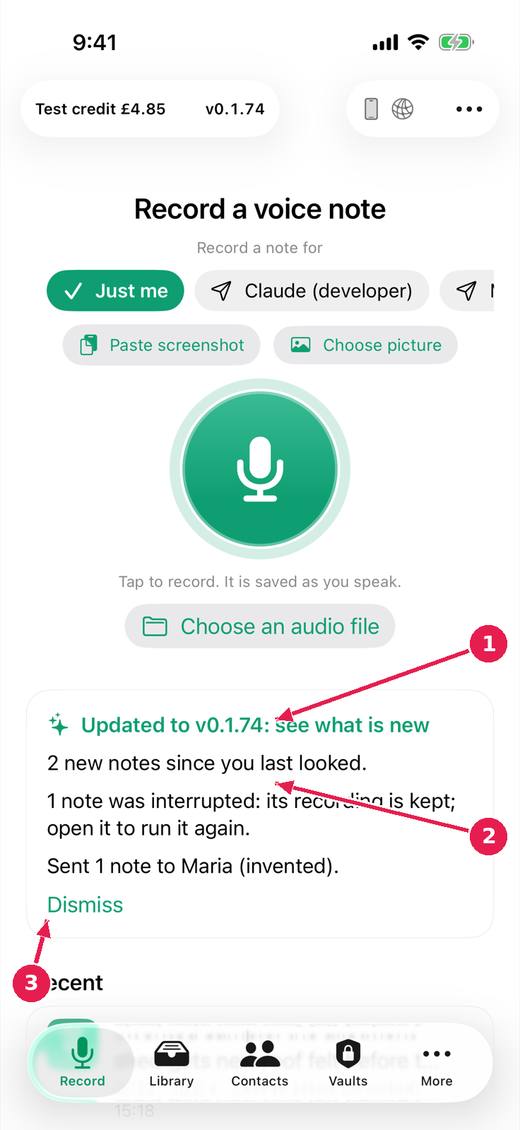
- The app was updated: tap to see what is new in this version, in the Guide.
- What happened since you last looked: new notes, interrupted ones, sends and saves.
- Dismiss it. The card is worked out again each time the app opens.
Where this stands
- The version in plain sight, release notes worth reading, and a briefing on opening: In progress. The issue says: "Items 3 and 4 begun (untried on a device): the app notices an update and links its page; a briefing card says what happened since the last opening, worked out..."
Pictures: VoiceDebrief: iPhone, light, from screens.yml run 43606968488 on work/sherpa at 0f2e6f8 (the same tree as dev, v0.1.74, 14 November 2026), after the design session's restyle.