VoiceDebrief iOS / guides / recipients
Contacts: send a note to somebody
A contact is a person, another device or an agent session that has given you their link. A note sent to them is encrypted on this device to their key: nobody else can read it, including the server that carries it.
Every guide · Ideas and where they stand
1. Contacts, Recipients.
A contact is anyone who can receive a note: a person, another device or an agent session. You add one by their QR code or link; what you send is sealed to their key before it leaves.
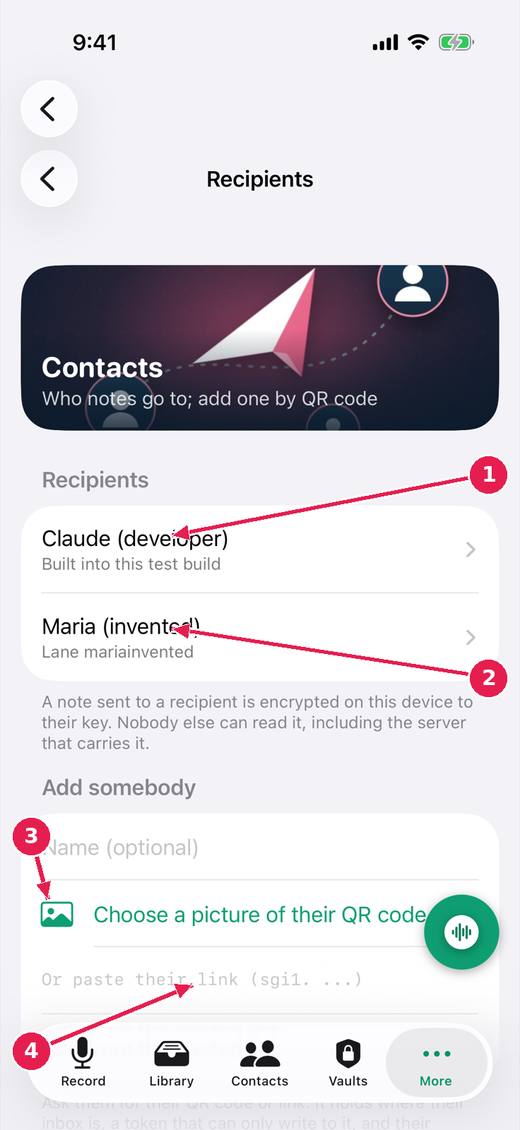
- Built into this test build: Claude (developer), who can read what you send. It asks before sending.
- Somebody you have added.
- Add somebody from a picture of their QR code, or scan it with the camera.
- Or paste their link. It can only write to their inbox: it cannot read anything.
Where this stands
- Lanes are recipients, and the app has an inbox: In progress. The issue says: "Built: recipients with names; add by QR code (camera or a picture) or pasted link; one Send button per recipient on a note; a recipient's QR code shown so it..."
- Act on a note at once: send without waiting, controls that do not move: In progress. The issue says: "Built (untried on a device): the Send buttons are a bar fixed at the bottom of the note, in the same place whatever the note above is doing; pressing one before..."
- A send that can be seen, stopped and not lost: Built, untried. The issue says: "Built (untried on a device): pendingSend and sendProblem kept on the note on disk; waiting sends resumed at launch and when the note is ready; Do not send on..."
Pictures: VoiceDebrief: iPhone, light, from screens.yml run 43606968488 on work/sherpa at 0f2e6f8 (the same tree as dev, v0.1.74, 14 November 2026), after the design session's restyle.