SGit Vaults: open a vault you were sent, or make one
SGit Vaults keeps photos, videos, large files and secrets in encrypted vaults that a teammate can open. A vault you create is kept on this device and needs no account, no access key and no network until you share it.
Every guide · Ideas and where they stand
1. The first screen.
The first screen of SGit Vaults lists your vaults and everything else the app holds: secrets, questions from the people building it, the Guide and the gallery.
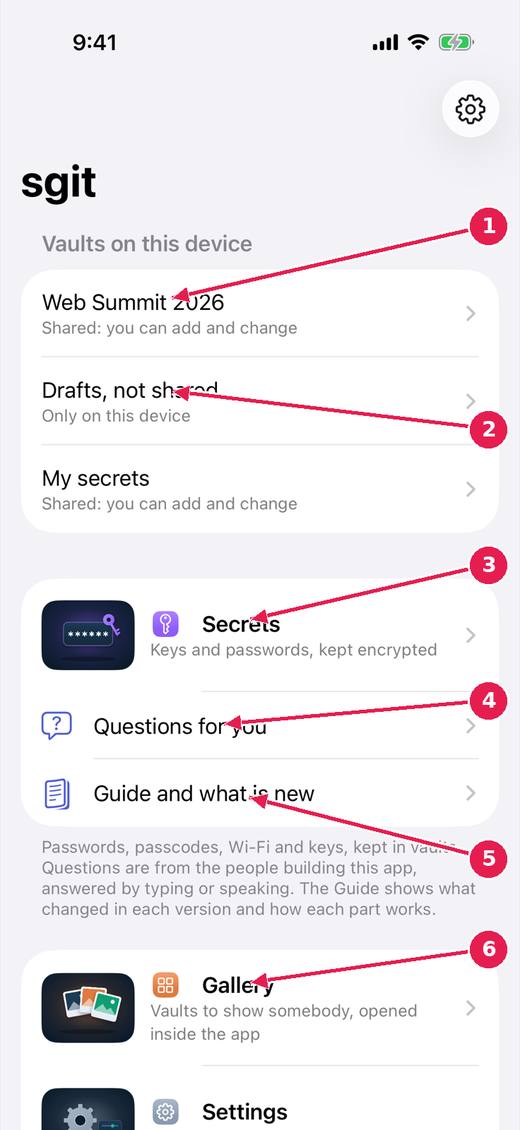
- A shared vault: on the server, and you can add and change.
- A vault only on this device, not shared with anybody.
- Secrets: passwords, passcodes, Wi-Fi and keys, kept encrypted in vaults.
- Questions for you, from the people building the app: answer by typing or speaking.
- Guide and what is new: what changed in each version and how each part works.
- Gallery: vaults to show somebody, opened inside the app. Adding a vault you were sent and creating one are further down.
2. Add a vault you were sent.
If someone sent you a vault, this is where it goes in. What you paste decides what you can do: a vault key can add and change, a read key can only look.
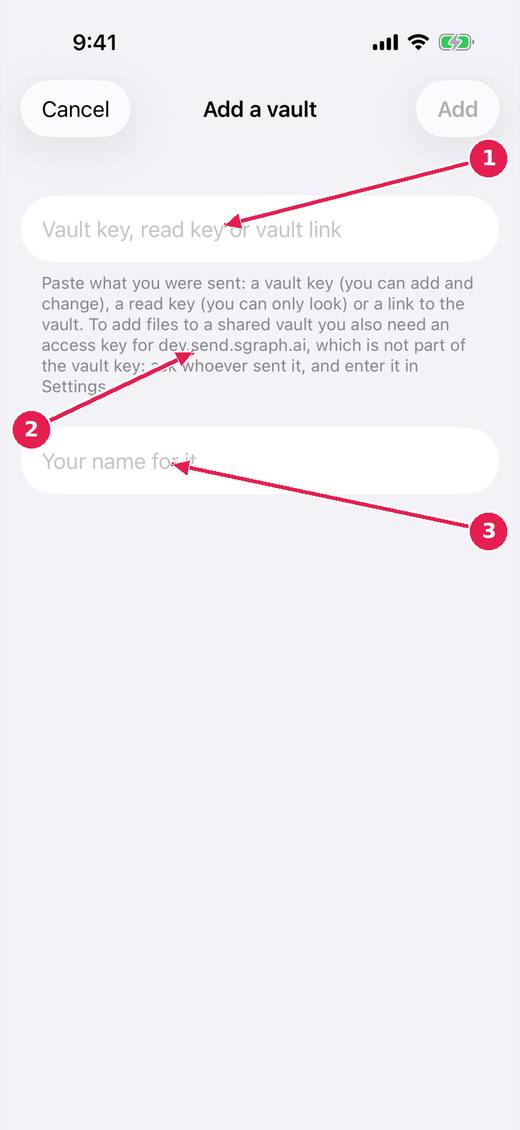
- Paste the vault key, read key or link you were sent.
- A read key can only look. To add files to a shared vault you also need an access key for the server, which is not part of the vault key: ask whoever sent it.
- Your own name for the vault, on this device.
Where this stands
- The sgit app, milestone one: In progress. The issue's Idea status line: "Much of milestone one is built: see website/sgit-app/built/index.md. Not yet used on a device against the live server."
- sgit app: a teammate sent a vault key cannot add to it: In progress. Open, and named by the release notes of v0.1.45.
- A gallery of vaults, opened in a browser inside the app: In progress. The issue says: "Built: a Gallery screen reached from the list of vaults. Entries have a name, a line about them, a topic and a link; they are grouped by topic and can be..."
Pictures: SGit Vaults: iPhone, light, from sgit-app-screens.yml run 43606971217 on work/sherpa at 0f2e6f8 (the same tree as dev, 14 November 2026), after the design session's restyle.