VoiceDebrief iOS / guides / vaults
Vaults: your notes, encrypted, on the device first
A vault is an encrypted, version-controlled folder you own. It is made on this device and needs no server and no network. A server is a remote you can push it to, so that it is kept elsewhere as well.
Every guide · Ideas and where they stand
1. The Vaults tab.
A vault is an encrypted, version-controlled folder you own. It is made on this device and needs no server; adding a server later keeps a copy elsewhere.
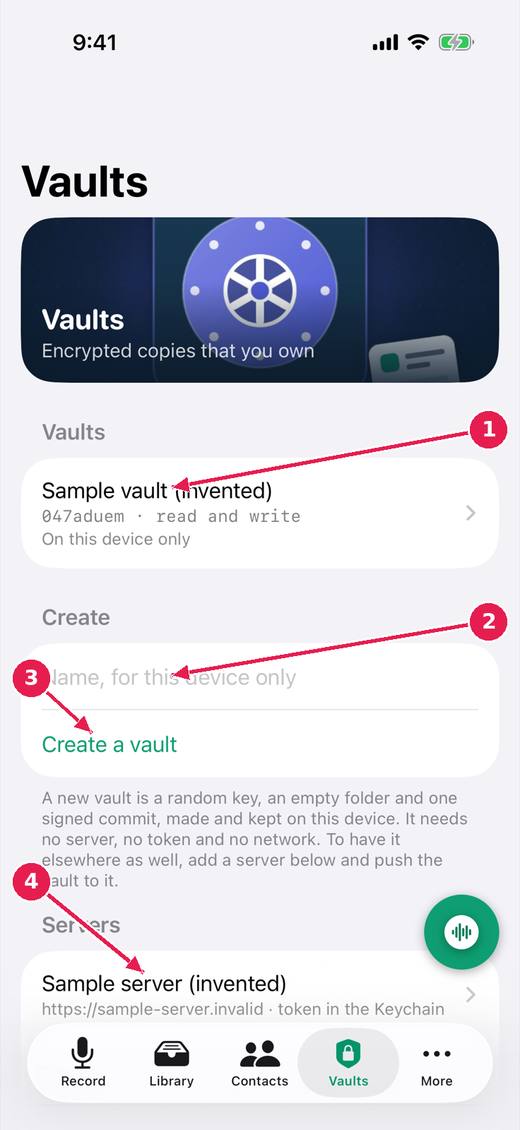
- Your vaults, and where each one is: on this device only, or on a server too.
- A name for a new vault.
- Create a vault: a random key, made and kept on this device.
- Servers you can push a vault to. The access token is kept in the Keychain.
2. Inside a vault.
Inside a vault you can see where it lives, push it to a server or pull from one, and check its latest commit and signature. Each saved note is a folder in it.
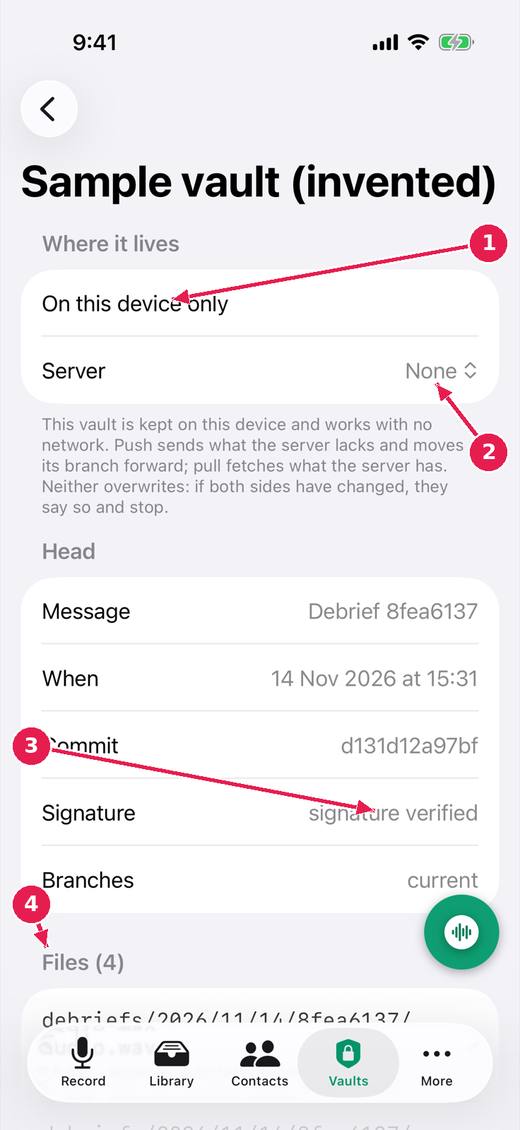
- Where it lives: on this device only, or also on a server.
- Choose a server to push to and pull from. Neither ever overwrites: if both sides changed, it says so and stops.
- The latest commit, and its signature checked.
- The files in the vault: each saved note is a folder of debrief, transcript, run and audio.
Where this stands
- Vaults are local first; a server is a remote: Built, untried. Done in the code, and the issue says: "Status: done in the code and its tests; not yet run on a device. See the article "The vault is a version-controlled store"."
- Vault keys and server tokens in iCloud Keychain, on by default: Built, untried. Done in the code, and the issue says: "Status: done in the code and its tests; not yet seen between two devices. Decided by the owner, 13 November 2026, and confirmed by him in the work/local-vaults..."
- A vault, for someone who has never met one: In progress. Open, and the reality file lists for it: Reviews from the pictures.
Pictures: VoiceDebrief: iPhone, light, from screens.yml run 43606968488 on work/sherpa at 0f2e6f8 (the same tree as dev, v0.1.74, 14 November 2026), after the design session's restyle.